 Documentation
Aggregated Measurement Data
Preparation
If the old data aggregation (<=8.1.2) is active, it is needed to disable the PostgreSQL sync job.
psql -U infosim -d infosim -c "SELECT delete_job((SELECT max(job_id) FROM timescaledb_information.jobs where proc_schema = 'stablenet' AND proc_name = 'update_measurement_data_aggregated'));"
Furthermore it’s advised to remove the old aggregate tables and refactor the data queries to use the ones created by the new data sync.
Ensure that the settings in /etc/stablenet-fdw/stablenet-fdw.conf are correct.
Initial Synchronization
Measurement data sync from StableNet/Oracle/MySQL is done using the following SKOOR Scripts created in the StableNet group when running init-data-source.py.
The scripts should be run manually the first time in sequential order to ensure everything is working fine.
When running the scripts for the first time, only data for the current day are synced. Historical data can be synced later, after setup of the automatic synchronization.
The SERVER_IDenvironment variable is only needed if configured. This commands have to be executed for every SERVER_ID separately.
Measurement Sync
This script syncs the measurements from the StableNet API based on the configured tag filters. This is later used in the incremental sync to sync only data for required measurements.
Incremental Sync
This command syncs raw measurement data from Oracle/MySQL to PostgreSQL. With every run, only new data is synced. The data is stored in sn_ping_data, sn_snmp_data and sn_usrscript_data. Additionally, it aggregates this raw data into the stablenet_measurement_data_minutely table which contains value_avg, value_min and value_max.
Aggregate Sync
This step is optional and only required if one needs the 5 and 15 minutes buckets. If not, continue with the hourly sync instead. If you don’t need those, you should also remove the corresponding bucket sizes from the dq_stablenet_measurement_data data query.
Aggregates raw data from incremental sync into 5 minutely and 15 minutely buckets. Data is stored in stablenet_measurement_data_5_minutely and stablenet_measurement_data_15_minutely. The resulting tables contain value_avg, value_min and value_max colmns for the aggregated rows.
Aggregate Hourly Sync
Aggregates data from the stablenet_measurement_data_minutely table into stablenet_measurement_data_hourly. While this table contains value_min and value_max, it does not contain value_avg. Instead, it contains timescaledb statistic columns instead (stats_agg statssummary2d, percentile_agg uddsketch, state_agg stateagg, ). This columns can later be used to get many statistical information about the aggregated data.
Measurements to get state_agg data for have to be configured in /etc/stablenet-fdw/stablenet-fdw.conf using the snmp_state_agg_measurements option. Measurements are defined by template name and metric key. e.g.
snmp_state_agg_measurements = Interface Relative IPMPLS 64Bit#1008
Multiple measurement / metric key pairs can be separated by a comma.
Only activate state_agg on Measurements / Metrics with low cardinality, means only very few distinct values (e.g. enums).
Stats Sync
Performs a rollup on statistical data from stablenet_measurement_data_hourly into stablenet_measurement_data_daily, stablenet_measurement_data_weekly, stablenet_measurement_data_monthly, stablenet_measurement_data_quartely and stablenet_measurement_data_yearly.
Automatic Synchronization
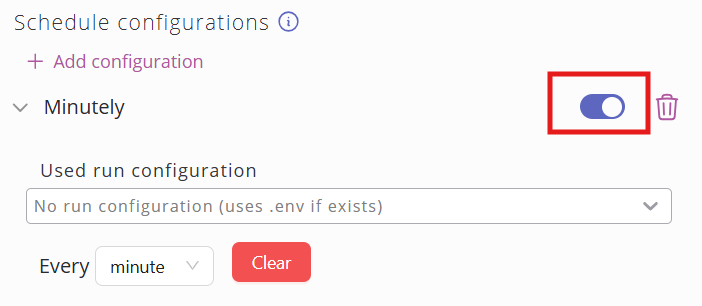
After running the sync scripts manually, we want to enable the script schedules to perform the sychronisation automatically.
History Sync
Run this script AFTER the initial sync and AFTER setting up the automatic synchronization.
This script syncs historical data based on the [history_sync] days, start_date and end_date config. Usually, for an initial history sync, you might only want to set days or keep the settings as is and simply sync back for one year.