 Documentation
Data source query editor (Search query)
Create data source queries for table and chart widgets to select specific data from a database. Queries are built in the form of a database field followed by the = sign and an operator, number or string:
database_string=my string
database_number=1234
database_number=BETWEEN(3, 6)
The queries can be enriched by specific JavaScript code:
Time and date calculation with momentjs
Operators
Operator | Description |
|---|---|
| Range from start to end value. Start and end values are comma separated |
| Comma separated list of numbers or strings to compare against |
| Greater than value |
| Greater than or equal to value |
| Lower than value |
| Less than or equal to value |
| Negation of an expression |
| List of comma separated expressions. All must be fulfilled |
| List of comma separated expressions. At least one must be fulfilled |
| Checks if a value is NULL |
Examples
Select all records with a salary greater than 40000:
salary=GT(40000)
Select all records with names other than James, John and Joe:
name=NOT(IN(James%2CJohn%2CJoe))
Select all records with a non-NULL customerId:
customerId=NOT(NULL())
Commas in arguments should be escaped:
, -> %2C
This is needed if nested operators are used as in the example above.
Examples with momentjs
In the following examples, params.interval is set by a date picker widget
Select only records with a date between the begin and end date/time parameter provided by a date picker widget. Begin, end and format() are used from the momentjs library:
date=BETWEEN(${interval(params.interval).begin.format()}, ${interval(params.interval).end.format()})
Select records from one year before:
year=${interval(params.interval).begin.subtract(1, 'years').format('YYYY')}
Query the same month one year before with the month formatted without leading zeroes:
month=${interval(params.interval).begin.subtract(params.sub, 'years').format('M')}
Query the weekday (0-6):
weekday=${interval(params.interval).begin.day()}
Parameter dependent query
If a query should be applied only if a specific parameter is set (e.g. a filter matrix query), the column as well as the query string can be wrapped into if statements:
${filterMatrix.device_name ? 'device_name' : 'none'}=${filterMatrix.device_name ? filterMatrix.device_name : ''}
If the parameter filterMatrix.device_name is defined, the column will be set to ‘device_name’ and the query string to 'filterMatrix.device_name’):
device_name=filterMatrix.device_name
If the same parameter is not defined, the resulting query will be configured for the probably non-existent column ‘none’:
none=''
Using search query with date picker
The date picker widget allows users to select a date or date range that is passed as a URL parameter.
These parameters can be used in search queries, as shown in the following example:
Assume employee records have
hire_dateandexit_datefields. Ifexit_dateisNULL, the employment is still active with no planned termination date.Selecting a date range in the picker (e.g., Feb 2022 to Dec 2026) sets the following URL parameters:
interval=BETWEEN(2022-02,2026-12)intervalBucket=monthintervalType=month
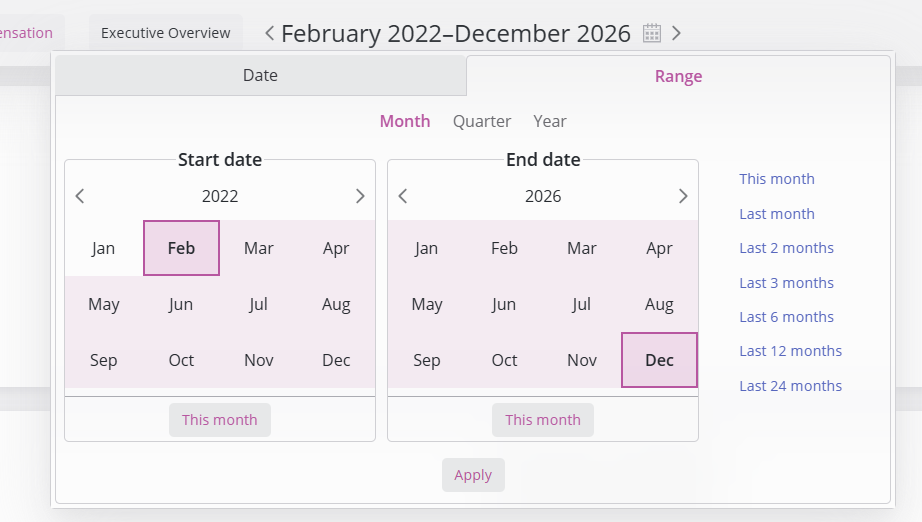
To filter the Employees table for records that overlap with the selected range, use the following search query:
hire_date=LE(${interval(params.interval).end.format()})
exit_date=OR(NULL(), GE(${interval(params.interval).begin.format()}))
Each line represents an independent rule; multiple rules are evaluated with an implicit AND condition.
Query explanation:
hire_dateis less than or equal to the end of the interval (on or before Dec 2026)AND
exit_dateis eitherNULLor greater than or equal to the start of the interval (on or after Feb 2022)